
Fiber Optic, Network
PON FTTX Explained: A Fiber Network Guide for Business

Jun
PON FTTX is a fiber optic network technology now widely used by businesses, hotels, factories, housing estates, office buildings and internet service providers. All of them need communications that are fast, stable and ready to grow. This guide explains in plain terms what PON FTTX is, how it works, where it fits, how it differs from older cabling, and how to choose the right design for a real site.
If you are planning a fiber installation for your organisation or a field project, see our fiber optic and FTTX installation service to find the approach that suits your project.
What Is PON FTTX?
PON FTTX is a fiber optic network that uses Passive Optical Network (PON) technology to distribute signals from one source to many end points over optical fiber. FTTX means running fiber to an end point, which could be a home, a building, a guest room or a specific work area. The system is designed for fast, highly stable data transfer, avoids the limits of copper cable and supports long-term expansion.
It is becoming more popular because businesses no longer just need internet that “works”. They need a network that carries many services at once: IP CCTV, WiFi, IP phones, hotel systems, office systems, cloud applications and large data transfers. Choosing PON FTTX is about speed and stability, and about laying an infrastructure foundation that is ready for the future.
What Does FTTX Stand For?
FTTX stands for Fiber To The X, where X is the point the fiber reaches. Common variants are:
- FTTH (Fiber To The Home): fiber runs to a residence.
- FTTB (Fiber To The Building): fiber runs to a building.
- FTTO (Fiber To The Office): fiber runs to an office.
- FTTR (Fiber To The Room): fiber runs to a room or sub-area.
- FTTN (Fiber To The Node): fiber runs to a main distribution point, and the last stretch uses another type of cable.
Understanding FTTX helps project owners see how far into the site the fiber will go. That affects the budget, the equipment needed, cable distances and final performance.
What Does PON Stand For?
PON stands for Passive Optical Network. It is a fiber architecture that uses unpowered splitters, called optical splitters, to share the signal from the source with many users at once. Its main advantages are fewer active devices along the route, lower energy costs, fewer points of failure and easier maintenance.
Compared with networks that need switches or powered equipment at many points, PON is physically simpler. This is especially true where cables run long distances or serve many rooms, floors or buildings. Fewer devices along the way usually means better stability and signal quality.

Main Components of a PON FTTX System
1) OLT (Optical Line Terminal)
The OLT is the head-end device, usually installed in a control room, data centre or main equipment room. It controls the network and sends signals to every end point. It is the heart of a PON, and it determines the number of ports, how bandwidth is managed and how far the system can expand. See, for example, our GPON OLT models.
2) Optical Splitter
A passive device that splits the light signal into several paths, such as 1:4, 1:8, 1:16 or 1:32, without power. The split ratio must take into account distance, number of users and the overall optical budget.
3) ODN (Optical Distribution Network)
The ODN is all the fiber between the OLT and the end points: feeder cables, distribution cables, drop cables, cabinets, joints and splices. It must be designed carefully to keep loss within limits.
4) ONT/ONU (Optical Network Terminal/Unit)
The end device receives the fiber signal and converts it into Ethernet, WiFi, telephone or other ports as needed. It is the part users interact with, so choose it to match the ports and services required. See our xPON ONT models.
5) Other Components
Patch cords, pigtails, ODFs, splice closures, media converters, racks, UPS units and test tools such as an OTDR or optical power meter. All of these matter for installation quality and acceptance testing.
How PON FTTX Works
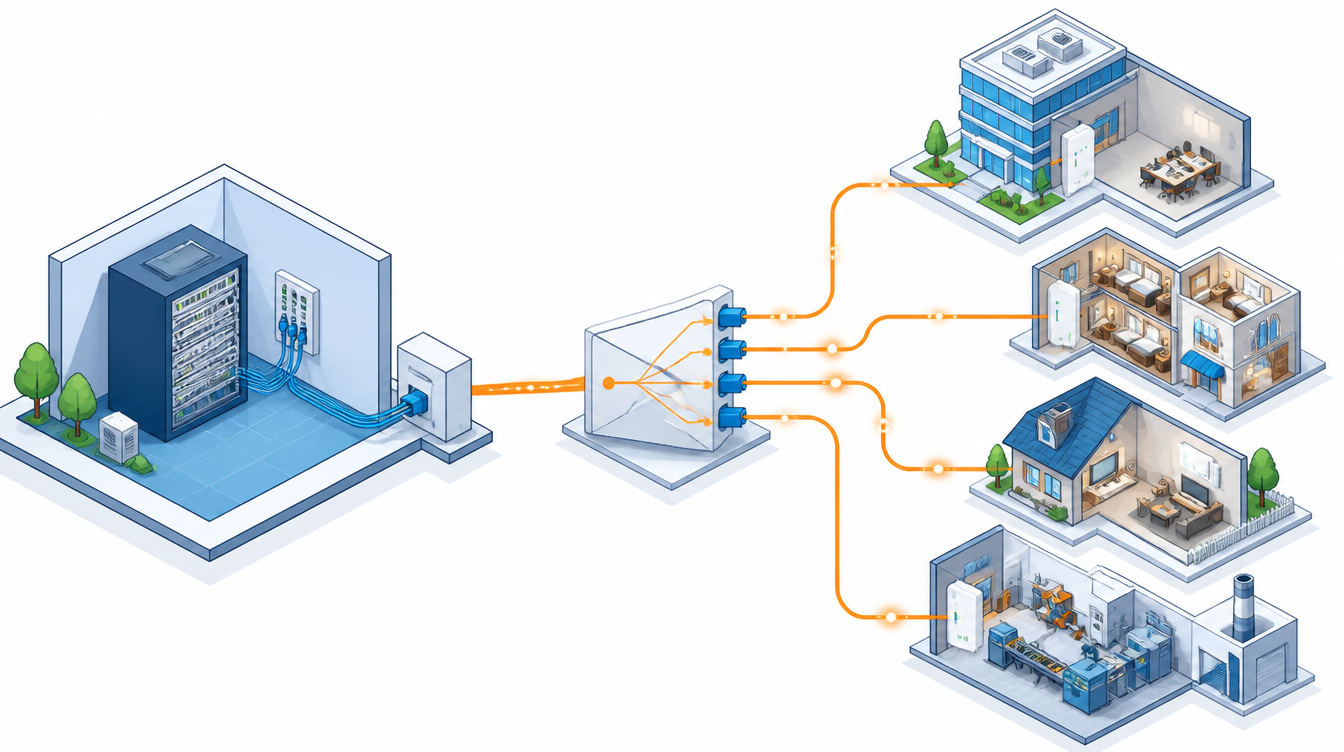
The OLT sends data as light over the fiber. A splitter then divides the signal to several end points. At each ONT/ONU, the signal is converted into a normal network connection for computers, CCTV cameras, access points or IP phones.
In the other direction, each end device sends data back up the same fiber in its own allocated time slot. That lets many users share the same cable infrastructure efficiently. This is why PON is ideal where you want to save on infrastructure but still need high speed.
In practice, it is like having a central distribution point that needs no power and little maintenance. Compare that with active switches in many sub-cabinets, each adding electricity costs, equipment costs and maintenance work.
Advantages of PON FTTX
- High speed and capacity: fiber carries far more data than copper. It suits sites running internet, CCTV, video conferencing and cloud applications at the same time, and buildings with many users.
- Stable, with little electrical interference: fiber is not affected by electromagnetic interference the way copper is. That makes it ideal for factories, industrial areas and sites with heavy electrical equipment.
- Lower long-term infrastructure cost: the initial cost can be higher than copper on some sites. Over the system’s life, though, many projects find PON FTTX better value once you count expansion, lower power use from passive components and future maintenance.
- Easy to expand: with a backbone and split points planned from the start, adding rooms, buildings or users is easy and does not mean ripping out the existing system.
- Fits many businesses: hotels, resorts, factories, warehouses, offices, schools, hospitals and housing estates.

Where PON FTTX Fits Best
- Hotels and resorts that distribute internet to many rooms and buildings, with IPTV, CCTV and WiFi.
- Housing estates and condominiums that run fiber from a central point to many homes or units.
- Factories and warehouses that need long runs, immunity to interference, and support for control systems or IP cameras.
- Office buildings that separate networks by floor or department and expect to add points later.
- Smart building projects that run many communication systems over one infrastructure.
In Pattaya, Chonburi and Rayong, with constant hotel, industrial and real-estate projects, PON FTTX is often a strong choice. It keeps the overall network easy to manage and supports real business growth.
A typical example is our project that connected 32 CCTV cameras over a fiber PON FTTX system.
PON FTTX vs Copper and Traditional Designs
Compared with copper-based networks, such as long UTP runs or many active sub-switches, PON FTTX wins on several points:
- Distance: fiber suits much longer runs.
- Bandwidth: it carries more data.
- Interference: it performs better in electrically noisy areas.
- Maintenance: fewer active points along the route means fewer failures.
- Expansion: a good initial design is easier to extend.
PON FTTX still needs correct design. A poorly chosen split ratio, unsuitable materials or poor splicing can cause high loss and weak performance. The design and installation should be done by a team with real fiber experience.
Two other options are worth comparing. Point-to-point fiber gives a dedicated link between two points and suits paths that need very high dedicated bandwidth. With many end points, though, PON is more cost-effective. Adding more sub-switches can fix immediate problems quickly, but in the long run it adds power, heat, management and failure points. Many projects combine approaches: PON for the many end points and point-to-point for critical links.
Common PON Standards
- GPON is the most widely used standard in corporate, building, hotel and value-focused projects. It balances speed, equipment cost and availability of compatible devices and spares.
- EPON is more Ethernet-oriented. Some projects choose it to match existing equipment or the way their network team works.
- XG-PON and XGS-PON are newer standards for much higher bandwidth, many services or future-proofing large projects. Examples are smart buildings, data-heavy campuses and high-speed internet to many units at once.
Choosing between GPON, EPON and XGS-PON is not just about speed. Consider the budget, equipment availability, existing infrastructure and expansion goals for the years ahead.
How to Plan a PON FTTX Project
- Define the services. Will the network carry general internet, CCTV, VoIP, IPTV, building control or links between buildings? This drives equipment choice and capacity.
- Count the end points. The number of rooms, buildings, units or work points determines the splitters, OLT ports and backbone design. If growth is likely, allow spare capacity now to avoid costly changes later.
- Calculate distance and optical loss. Add up loss from cable, splices, connectors and splitters so every end device still receives a good signal. Testing with proper instruments after installation is essential.
- Choose suitable equipment. OLTs and ONTs/ONUs come in many models. Some suit basic internet, others support voice, WiFi or more port types. The wrong choice either overspends or fails to cover your needs.
- Plan for maintenance and expansion. Define ODF locations, cabinets, cable routes and labelling from the start. Keep documentation such as route diagrams, core mapping and test results. It saves a lot of troubleshooting time.
Installation Steps Done Properly
- Site survey: check cable routes, equipment locations, distances, user numbers and building limits. These include existing conduits and trays, cabinet space and environmental conditions.
- Route and topology design: decide the backbone path, the split points, a star, tree or hybrid topology, and where to leave room for expansion.
- Materials and equipment: outdoor, indoor, drop and armoured cable, racks, ODFs, splitters, pigtails and patch cords, chosen for the conditions. Outdoor runs must handle sun, rain, humidity and tension.
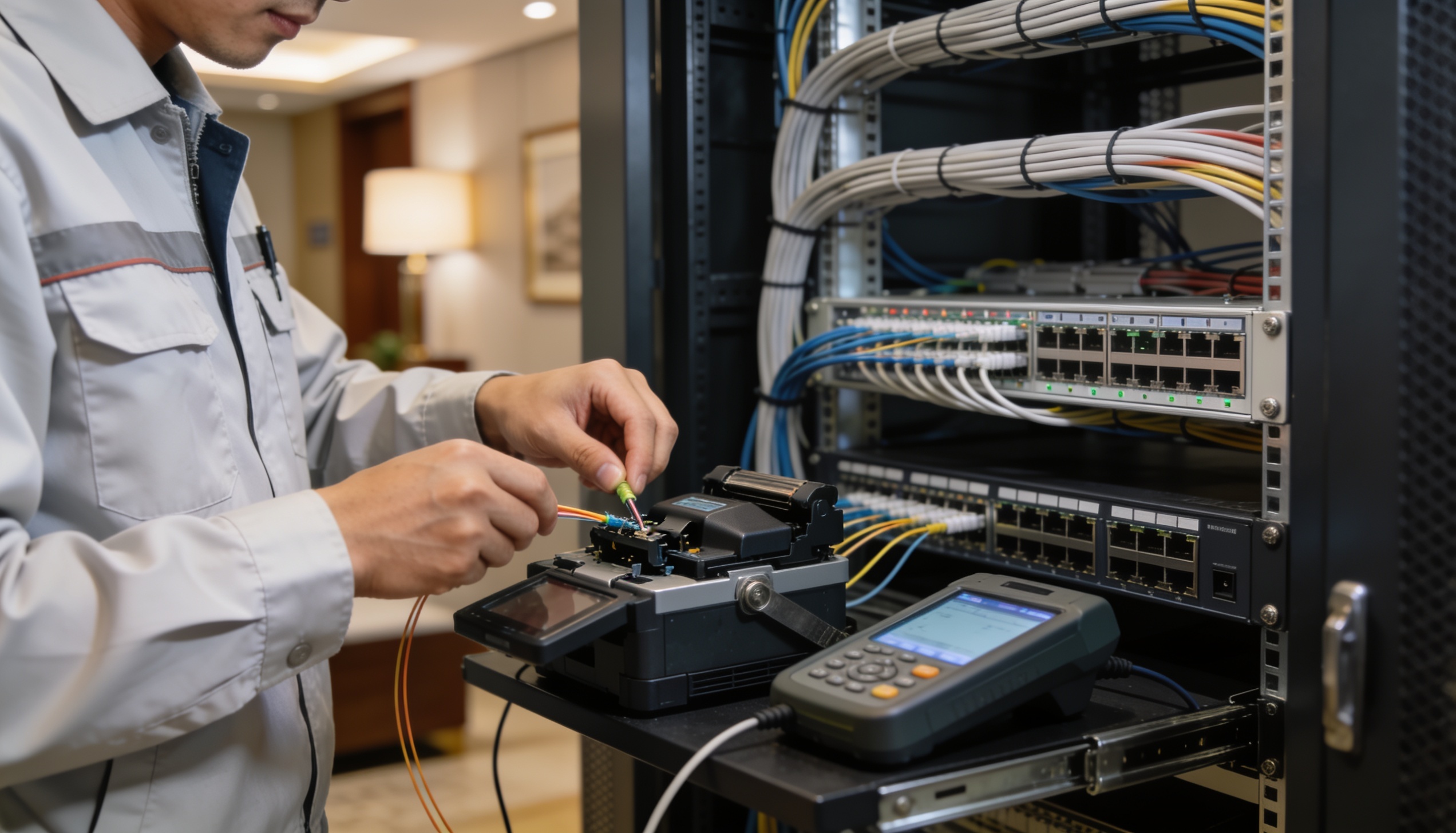
- Installation and splicing: splice quality directly affects loss, and tidy cable management in cabinets and closures prevents hard-to-fix problems later.
- Testing and records: test with an optical power meter or OTDR to confirm signal levels, and keep the results for handover and future maintenance.
- Handover and training: provide layouts, device locations, cable numbers and basic care instructions to the site team.
Design Tips by Site Type
Hotels in Pattaya
Hotels often have many floors, zones and buildings, and must support guest internet, cameras, IP phones and internal management systems. PON FTTX reduces the number of intermediate switches and organises fiber from a central point to each building or floor. It handles heavy simultaneous WiFi use and reduces signal problems across floors. It also supports cameras and access points across lobbies, corridors, car parks, restaurants and outdoor areas. With spare splitters, cores and backbone routes planned in, future renovations or extra rooms cost less.
Factories in Chonburi and the EEC
For factory fiber, speed is only part of the story. Durability, distance, network separation and after-installation care matter too, because offices, production lines, warehouses and loading yards often share one infrastructure. Survey the real distances between buildings, control points and camera locations. Place cabinets where they are easy to reach, have backup power and good ventilation, and are away from dust, humidity and machine vibration. Separate office, camera, voice and machine-control networks with VLANs. Size uplinks and the optical budget for the real load from IP cameras, machines and sensors.
Office Buildings in Rayong
Consider user numbers, the tenancy layout and future changes. FTTB (fiber to the floor) suits buildings that still use a switch on each floor and want to control the initial budget. FTTO, which brings fiber closer to work areas, gives more flexibility for moving departments, adding points and avoiding long-term bottlenecks. If you need data, voice, WiFi, CCTV and meeting systems on one infrastructure, plan QoS and network segmentation for each service.
Housing Estates and Condominiums
These projects distribute services from a central point to many units. PON FTTX does this cost-effectively and is easy to manage, especially when new phases or users are added. Plan the backbone and splitters from phase one.
Running CCTV, WiFi and IP Phones on PON FTTX
One fiber infrastructure can carry CCTV, wireless and IP telephony at once. The keys are uplink design, the right ONT/ONU and correct service separation:
- CCTV: account for camera count, resolution and continuous recording so the uplink does not become a bottleneck.
- WiFi: plan for concurrent users, device density and access-point placement.
- IP phones: design QoS and continuity for voice, which is sensitive to latency and packet loss.
Common Installation Mistakes
- A split ratio so high that end-point signals are weak.
- Not calculating total system loss before installing.
- End devices that do not match how the site is used.
- Cable routes with no allowance for future maintenance.
- No labelling or core-mapping documents.
- No testing after installation, or testing only a few points.
- Indoor materials used outdoors, shortening their life.
These mistakes may not show on installation day. Over time, though, they cause instability, difficult repairs and painful expansion. Choose a team with real fiber experience, not just general cabling.
Maintenance After Installation
- Clean connectors and patch cords regularly.
- Record power levels at key points so you can compare them when problems occur.
- Inspect ODFs, splice closures and outdoor cable routes on a schedule.
- Update the system layout whenever units are added or removed.
- Keep basic spares such as patch cords, pigtails and common connectors.
Checklist Before You Commit
- Do you know how many points you have today, and how many you expect over the next three to five years?
- Do you know the real distances between buildings, floors and zones?
- Which services must it carry: CCTV, WiFi, VoIP, internet, IPTV?
- Is there space for racks, ODFs and distribution points, with backup power and ventilation?
- Are there aesthetic limits on cable routes, for example in a hotel lobby or guest rooms?
- When can work be done without disrupting guests, staff or production?
- Will you receive test reports, route diagrams, core mapping and warranty details at handover?
Questions to Ask Your Installer
- Which FTTX design suits this site, and why?
- Can the proposed split structure handle current and future users?
- Has optical loss been calculated, with margin for expansion?
- Which cable and equipment brands or standards will be used, and what is the warranty?
- Will OTDR or power-meter test results be handed over?
- How will the system expand if we add rooms, buildings or services?
- Do you offer after-installation support, emergency repair or preventive maintenance?
FAQ
Can PON FTTX be used for CCTV?
Yes. It is especially suitable where cables run long distances, such as large projects, factories, hotels and open areas, because fiber carries data far and avoids interference.
Is PON FTTX better than running UTP everywhere?
Not in every case. For long distances, heavy use, high stability needs or planned expansion, PON FTTX usually has a clear advantage. For short runs in very small areas, combining it with other cabling may make better budget sense.
Is the initial cost higher than a traditional network?
Often, yes, especially for very small projects. But over the system’s life, counting expansion, power, intermediate equipment and maintenance, PON FTTX is usually better value for projects with many points or high growth potential.
Several buildings: PON FTTX or point-to-point fiber?
It depends on the number of end points, how they are used and the budget. PON suits many end points served cost-effectively. Point-to-point suits critical links needing very high dedicated bandwidth. Many projects in the EEC use both.
Do we need special test equipment?
Yes. Checking that a light is on or the internet works is not enough for quality fiber work. An OTDR and an optical power meter show loss, joint quality and overall link condition. That data is essential for acceptance and future troubleshooting.
Is PON FTTX only for large projects?
No. Medium-sized organisations can benefit too if they have long distances, several areas or high stability needs. Examples are multi-floor offices, mid-size hotels, schools and multi-building clinics. The key is sizing the design correctly, neither over-spec nor under-spec.
Our current network still works. Should we switch now?
Not necessarily straight away. Start assessing when the existing network becomes a limitation: not enough speed, hard to expand, frequent downtime or harder to maintain every year. A phased migration, for example backbone first and then busy areas, reduces risk and spreads the budget.
What documents should we ask for after the job?
The system layout, equipment list, cable numbers or core mapping, OTDR or power-meter results, device locations and warranty information.
Summary
PON FTTX is a fiber optic network that distributes signals through passive components. That makes it ideal where you need high speed, stability, low maintenance and room to grow. It works for hotels, factories, offices, housing estates and any project that needs an efficient communications backbone.
What matters is not just choosing fiber but planning for the real site: the FTTX design, split ratio, equipment, distances, splicing, testing and future expansion. Designed and installed correctly, it clearly reduces network problems and improves the reliability of your business.
Need a fiber or FTTX network in Pattaya, Chonburi or Rayong? See our fiber optic installation service and network systems, call 033-265-438, LINE @Nicesystem (include the @), or contact us online. Service area: Pattaya, Bang Lamung, Sattahip, Si Racha, Chonburi city, Amata City, Pluak Daeng, Rayong and nearby areas.
Pingback: Fiber Optic for Business in Pattaya, Chonburi & Rayong