
Network
Ubiquiti vs Grandstream vs TP-Link: Business WiFi Compared

Mar
Whether you are weighing Ubiquiti vs TP-Link or also considering Grandstream, when comparing these business WiFi brands for hotels, restaurants and offices in Pattaya, Chonburi and Rayong, look beyond the price of the access points. Consider:
- signal stability;
- how easily you can manage many access points;
- the total budget;
- captive portal support;
- long-term ease of maintenance.
A good business WiFi system also needs the right AP placement, capacity for the number of users and a network structure that fits the real site.
Quick Summary: Ubiquiti vs Grandstream vs TP-Link
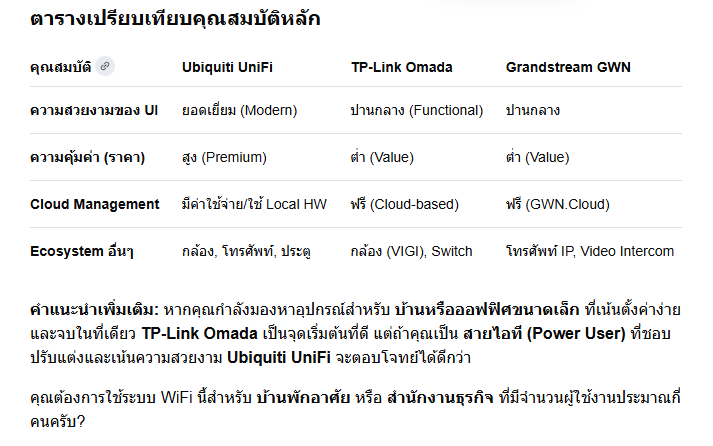
If you want a system that is easy to manage with a complete ecosystem, Ubiquiti UniFi suits offices, hotels and buildings that want a single dashboard. Grandstream GWN suits businesses that want good value and cloud management within a controlled budget. TP-Link Omada suits shops, SMEs and offices that want to start with business WiFi at a lower cost.
| Ubiquiti UniFi | Grandstream GWN | TP-Link Omada | |
|---|---|---|---|
| Best known for | Polished software and a wide ecosystem | Strong hardware specs for the price; embedded controller | Value for money; business features at an accessible price |
| Typical fit | Offices, hotels, multi-floor buildings | Hotels, multi-floor buildings, cafés and SMEs on a budget | Shops, cafés, small and mid-size businesses |
| Management | Very intuitive UI; controller or cloud | Embedded controller in some models, plus cloud management | Cloud management; UI less modern than UniFi |
| Main trade-off | Usually the most expensive of the three | Less familiar to general users; mobile app less complete | Some advanced security features less detailed on some models |
Which WiFi System Suits Your Business?
- Hotels, resorts and multi-floor buildings: Ubiquiti or Grandstream, designed with seamless roaming and a separate guest WiFi VLAN.
- Restaurants, cafés and SMEs: TP-Link Omada or Grandstream keep the budget under control and still make managing several APs easy.
- Factories and warehouses: design WiFi together with fiber optic, PoE switches and network monitoring, so coverage matches the real site.
If the site has several buildings or many users, plan WiFi together with a fiber optic backbone. For factories, plan it alongside the factory security system, so WiFi, CCTV, access control and the network run reliably on the same infrastructure.
The choice between Ubiquiti (UniFi), Grandstream (GWN) and TP-Link (Omada) depends on how much weight you give to budget, feature depth and the ecosystem of devices you want to use together.
The Brands in Detail
Ubiquiti UniFi
UniFi leads on user experience, with the most modern and detailed management interface.
- Strengths: the most attractive, easy-to-understand interface, and a very wide ecosystem including switches, gateways, cameras and door access.
- Considerations: hardware is usually priced noticeably higher than competitors. Cloud management may cost extra unless you run your own hardware controller (such as a Cloud Key), and stock availability has been patchy at times in the past.
TP-Link Omada
Omada was developed to compete directly with UniFi, with a focus on value and easy installation.
- Strengths: clearly cheaper hardware than UniFi overall, and a cloud management option without an annual fee (check current licensing terms when you buy).
- Considerations: the interface may look less modern than UniFi. On some models, advanced security features such as detailed firewall rules or IDS/IPS are not as granular as on other brands.
Grandstream GWN
Grandstream often offers higher hardware specifications at prices close to TP-Link.
- Strengths: strong throughput, often especially on 2.4GHz, compared with similar-class UniFi models. Some APs have an embedded controller, so you can manage a small group of APs without buying a separate controller.
- Considerations: the management interface and support are less widely known among general users than the other two brands, and the mobile app may not be as complete as UniFi’s.
See our range of Grandstream network and WiFi products and GWN Cloud management.
Product lines, pricing and licensing change frequently. Always check the current models and terms before you buy.
Good Design Matters More Than the Brand
Whichever brand you choose, WiFi performance depends on the design:
- AP placement and channel planning to avoid interference and dead zones.
- Roaming so guests and staff stay connected as they move between floors and rooms.
- Good LAN cabling and PoE switches with enough power and capacity for every AP.
- VLANs that separate staff, guests, POS, CCTV and IoT devices.
- Central monitoring with alerts when an AP goes offline.
- Backup power (UPS) for the core switch and controller.
Checklist Before Choosing Business WiFi
Before deciding between Ubiquiti, Grandstream and TP-Link, survey the site and understand how people use it. A high-spec access point will not help if it is in the wrong place, the LAN cabling is poor, or there are more users than the design allowed for.
- Peak concurrent users, for example in restaurants, hotels, meeting rooms or offices.
- Dead zones, concrete walls, mezzanines, warehouses and outdoor areas.
- VLAN separation for staff, guests, POS, CCTV and IoT devices.
- The controller, cloud management and alerts when devices go down.
- The total budget, including LAN cabling, PoE switches, racks, UPS and installation.
For multi-branch businesses, choose a platform that is easy to manage centrally and gives clear status reports. Admins can then find problems quickly, reduce site visits and keep the WiFi ready for long-term use.
FAQ: Choosing Ubiquiti, Grandstream or TP-Link
Can I choose based on the number of access points alone?
No. WiFi quality depends on:
- placement, transmit power and channels;
- user density;
- internet speed;
- the quality of the LAN cabling and PoE switches.
A site survey reduces interference, dead spots and unreliable roaming.
Which businesses need a controller-based system?
Hotels, restaurants, offices, factories and multi-floor buildings should use a controller or cloud management. Then you can monitor APs, update firmware, set SSIDs, separate user groups and troubleshoot from one place without walking to every AP.
Should staff and guest WiFi be separated?
Yes:
- Use separate SSIDs for staff, guests, POS, CCTV and IoT.
- Control access with VLANs and firewall rules.
- Set up a captive portal or vouchers for customer WiFi.
- Limit bandwidth for guest WiFi.
- Keep logs, and set passwords according to your security policy.
Summary
UniFi offers the most polished experience and ecosystem at a higher price. Omada offers the best value for small and mid-size businesses. Grandstream GWN offers strong hardware for the money and flexible controller options. The right choice depends on your site, your users and your budget, and a professional design matters as much as the brand.
Need business WiFi in Pattaya, Chonburi or Rayong? See our WiFi installation service and network systems, call 033-265-438, 096-246-2324, LINE @Nicesystem (include the @), or contact us online.
Pingback: Fiber Optic for Business in Pattaya, Chonburi & Rayong